tag: How-To

I Am Sitting in a Room Revisited

My remake of the Alvin Lucier artwork I Am Sitting in a Room was released 10 years ago today. To mark this occasion I want to revisit how I made it and troubles I had remaking it for 2019.

In November 2019 I Am Sitting in a Room was exhibited at Gamerz Festival in Aix-en-Provence in France. It was a pretty nice surprise to be invited to exhibit that piece, especially as it was made in 2010 and hasn’t been exhibited since aroudn 2015.


Motion Interpolation for Glitch Aesthetics using FFmpeg part 9

Below are a few examples of how you can use FFmpeg’s minterpolate to create artworks with a glitch aesthetic.

You can read about how I used it for an artwork in this blog post. You can also grab the source file for these videos here. Give it a try yourself!

mc_mode=aobmc:me_mode=bilat:me=ds

ffmpeg -i cat_rainbow_original.mp4 -filter:v "setpts=62.5*PTS,minterpolate='fps=25:mb_size=16:search_param=400:vsbmc=0:scd=none:mc_mode=aobmc:me_mode=bilat:me=ds'" 033_mc_mode=aobmc_me_mode=bilat_me=ds.mp4

mc_mode=aobmc:me_mode=bilat:me=hexbs

ffmpeg -i cat_rainbow_original.mp4 -filter:v "setpts=62.5*PTS,minterpolate='fps=25:mb_size=16:search_param=400:vsbmc=0:scd=none:mc_mode=aobmc:me_mode=bilat:me=hexbs'" 034_mc_mode=aobmc_me_mode=bilat_me=hexbs.mp4

mc_mode=aobmc:me_mode=bilat:me=epzs

ffmpeg -i cat_rainbow_original.mp4 -filter:v "setpts=62.5*PTS,minterpolate='fps=25:mb_size=16:search_param=400:vsbmc=0:scd=none:mc_mode=aobmc:me_mode=bilat:me=epzs'" 035_mc_mode=aobmc_me_mode=bilat_me=epzs.mp4

mc_mode=aobmc:me_mode=bilat:me=umh

ffmpeg -i cat_rainbow_original.mp4 -filter:v "setpts=62.5*PTS,minterpolate='fps=25:mb_size=16:search_param=400:vsbmc=0:scd=none:mc_mode=aobmc:me_mode=bilat:me=umh'" 036_mc_mode=aobmc_me_mode=bilat_me=umh.mp4

This blog post is part of a series. Click the links below to see more examples of FFmpeg’s motion interpolation:


Motion Interpolation for Glitch Aesthetics using FFmpeg part 8

Below are a few examples of how you can use FFmpeg’s minterpolate to create artworks with a glitch aesthetic.

You can read about how I used it for an artwork in this blog post. You can also grab the source file for these videos here. Give it a try yourself!

mc_mode=aobmc:me_mode=bilat:me=tss

ffmpeg -i cat_rainbow_original.mp4 -filter:v "setpts=62.5*PTS,minterpolate='fps=25:mb_size=16:search_param=400:vsbmc=0:scd=none:mc_mode=aobmc:me_mode=bilat:me=tss'" 029_mc_mode=aobmc_me_mode=bilat_me=tss.mp4

mc_mode=aobmc:me_mode=bilat:me=tdls

ffmpeg -i cat_rainbow_original.mp4 -filter:v "setpts=62.5*PTS,minterpolate='fps=25:mb_size=16:search_param=400:vsbmc=0:scd=none:mc_mode=aobmc:me_mode=bilat:me=tdls'" 030_mc_mode=aobmc_me_mode=bilat_me=tdls.mp4

mc_mode=aobmc:me_mode=bilat:me=ntss

ffmpeg -i cat_rainbow_original.mp4 -filter:v "setpts=62.5*PTS,minterpolate='fps=25:mb_size=16:search_param=400:vsbmc=0:scd=none:mc_mode=aobmc:me_mode=bilat:me=ntss'" 031_mc_mode=aobmc_me_mode=bilat_me=ntss.mp4

mc_mode=aobmc:me_mode=bilat:me=fss

ffmpeg -i cat_rainbow_original.mp4 -filter:v "setpts=62.5*PTS,minterpolate='fps=25:mb_size=16:search_param=400:vsbmc=0:scd=none:mc_mode=aobmc:me_mode=bilat:me=fss'" 032_mc_mode=aobmc_me_mode=bilat_me=fss.mp4

This blog post is part of a series. Click the links below to see more examples of FFmpeg’s motion interpolation:


Motion Interpolation for Glitch Aesthetics using FFmpeg part 7

Below are a few examples of how you can use FFmpeg’s minterpolate to create artworks with a glitch aesthetic.

You can read about how I used it for an artwork in this blog post. You can also grab the source file for these videos here. Give it a try yourself!

mc_mode=obmc:me_mode=bilat:me=hexbs

ffmpeg -i cat_rainbow_original.mp4 -filter:v "setpts=62.5*PTS,minterpolate='fps=25:mb_size=16:search_param=400:vsbmc=0:scd=none:mc_mode=obmc:me_mode=bilat:me=hexbs'" 025_mc_mode=obmc_me_mode=bilat_me=hexbs.mp4

mc_mode=obmc:me_mode=bilat:me=epzs

ffmpeg -i cat_rainbow_original.mp4 -filter:v "setpts=62.5*PTS,minterpolate='fps=25:mb_size=16:search_param=400:vsbmc=0:scd=none:mc_mode=obmc:me_mode=bilat:me=epzs'" 026_mc_mode=obmc_me_mode=bilat_me=epzs.mp4

mc_mode=obmc:me_mode=bilat:me=umh

ffmpeg -i cat_rainbow_original.mp4 -filter:v "setpts=62.5*PTS,minterpolate='fps=25:mb_size=16:search_param=400:vsbmc=0:scd=none:mc_mode=obmc:me_mode=bilat:me=umh'" 027_mc_mode=obmc_me_mode=bilat_me=umh.mp4

mc_mode=aobmc:me_mode=bilat:me=esa

ffmpeg -i cat_rainbow_original.mp4 -filter:v "setpts=62.5*PTS,minterpolate='fps=25:mb_size=16:search_param=400:vsbmc=0:scd=none:mc_mode=aobmc:me_mode=bilat:me=esa'" 028_mc_mode=aobmc_me_mode=bilat_me=esa.mp4

This blog post is part of a series. Click the links below to see more examples of FFmpeg’s motion interpolation:


Motion Interpolation for Glitch Aesthetics using FFmpeg part 6

Below are a few examples of how you can use FFmpeg’s minterpolate to create artworks with a glitch aesthetic.

You can read about how I used it for an artwork in this blog post. You can also grab the source file for these videos here. Give it a try yourself!

mc_mode=obmc:me_mode=bilat:me=tdls

ffmpeg -i cat_rainbow_original.mp4 -filter:v "setpts=62.5*PTS,minterpolate='fps=25:mb_size=16:search_param=400:vsbmc=0:scd=none:mc_mode=obmc:me_mode=bilat:me=tdls'" 021_mc_mode=obmc_me_mode=bilat_me=tdls.mp4

mc_mode=obmc:me_mode=bilat:me=ntss

ffmpeg -i cat_rainbow_original.mp4 -filter:v "setpts=62.5*PTS,minterpolate='fps=25:mb_size=16:search_param=400:vsbmc=0:scd=none:mc_mode=obmc:me_mode=bilat:me=ntss'" 022_mc_mode=obmc_me_mode=bilat_me=ntss.mp4

mc_mode=obmc:me_mode=bilat:me=fss

ffmpeg -i cat_rainbow_original.mp4 -filter:v "setpts=62.5*PTS,minterpolate='fps=25:mb_size=16:search_param=400:vsbmc=0:scd=none:mc_mode=obmc:me_mode=bilat:me=fss'" 023_mc_mode=obmc_me_mode=bilat_me=fss.mp4

mc_mode=obmc:me_mode=bilat:me=ds

ffmpeg -i cat_rainbow_original.mp4 -filter:v "setpts=62.5*PTS,minterpolate='fps=25:mb_size=16:search_param=400:vsbmc=0:scd=none:mc_mode=obmc:me_mode=bilat:me=ds'" 024_mc_mode=obmc_me_mode=bilat_me=ds.mp4

This blog post is part of a series. Click the links below to see more examples of FFmpeg’s motion interpolation:


Motion Interpolation for Glitch Aesthetics using FFmpeg part 5

Below are a few examples of how you can use FFmpeg’s minterpolate to create artworks with a glitch aesthetic.

You can read about how I used it for an artwork in this blog post. You can also grab the source file for these videos here. Give it a try yourself!

mc_mode=aobmc:me_mode=bidir:me=epzs

ffmpeg -i cat_rainbow_original.mp4 -filter:v "setpts=62.5*PTS,minterpolate='fps=25:mb_size=16:search_param=400:vsbmc=0:scd=none:mc_mode=aobmc:me_mode=bidir:me=epzs:'" 017_mc_mode=aobmc_me_mode=bidir_me=epzs.mp4

mc_mode=aobmc:me_mode=bidir:me=umh

ffmpeg -i cat_rainbow_original.mp4 -filter:v "setpts=62.5*PTS,minterpolate='fps=25:mb_size=16:search_param=400:vsbmc=0:scd=none:mc_mode=aobmc:me_mode=bidir:me=umh'" 018_mc_mode=aobmc_me_mode=bidir_me=umh.mp4

mc_mode=obmc:me_mode=bilat:me=esa

ffmpeg -i cat_rainbow_original.mp4 -filter:v "setpts=62.5*PTS,minterpolate='fps=25:mb_size=16:search_param=400:vsbmc=0:scd=none:mc_mode=obmc:me_mode=bilat:me=esa'" 019_mc_mode=obmc_me_mode=bilat_me=esa.mp4

mc_mode=obmc:me_mode=bilat:me=tss

ffmpeg -i cat_rainbow_original.mp4 -filter:v "setpts=62.5*PTS,minterpolate='fps=25:mb_size=16:search_param=400:vsbmc=0:scd=none:mc_mode=obmc:me_mode=bilat:me=tss'" 020_mc_mode=obmc_me_mode=bilat_me=tss.mp4

This blog post is part of a series. Click the links below to see more examples of FFmpeg’s motion interpolation:


Motion Interpolation for Glitch Aesthetics using FFmpeg part 4

Below are a few examples of how you can use FFmpeg’s minterpolate to create artworks with a glitch aesthetic.

You can read about how I used it for an artwork in this blog post. You can also grab the source file for these videos here. Give it a try yourself!

mc_mode=aobmc:me_mode=bidir:me=ntss

ffmpeg -i cat_rainbow_original.mp4 -filter:v "setpts=62.5*PTS,minterpolate='fps=25:mb_size=16:search_param=400:vsbmc=0:scd=none:mc_mode=aobmc:me_mode=bidir:me=ntss'" 013_mc_mode=aobmc_me_mode=bidir_me=ntss.mp4

mc_mode=aobmc:me_mode=bidir:me=fss

ffmpeg -i cat_rainbow_original.mp4 -filter:v "setpts=62.5*PTS,minterpolate='fps=25:mb_size=16:search_param=400:vsbmc=0:scd=none:mc_mode=aobmc:me_mode=bidir:me=fss'" 014_mc_mode=aobmc_me_mode=bidir_me=fss.mp4

mc_mode=aobmc:me_mode=bidir:me=ds

ffmpeg -i cat_rainbow_original.mp4 -filter:v "setpts=62.5*PTS,minterpolate='fps=25:mb_size=16:search_param=400:vsbmc=0:scd=none:mc_mode=aobmc:me_mode=bidir:me=ds'" 015_mc_mode=aobmc_me_mode=bidir_me=ds.mp4

mc_mode=aobmc:me_mode=bidir:me=hexbs

ffmpeg -i cat_rainbow_original.mp4 -filter:v "setpts=62.5*PTS,minterpolate='fps=25:mb_size=16:search_param=400:vsbmc=0:scd=none:mc_mode=aobmc:me_mode=bidir:me=hexbs'" 016_mc_mode=aobmc_me_mode=bidir_me=hexbs.mp4

This blog post is part of a series. Click the links below to see more examples of FFmpeg’s motion interpolation:


Motion Interpolation for Glitch Aesthetics using FFmpeg part 3

Below are a few examples of how you can use FFmpeg’s minterpolate to create artworks with a glitch aesthetic.

You can read about how I used it for an artwork in this blog post. You can also grab the source file for these videos here. Give it a try yourself!

mc_mode=obmc:me_mode=bidir:me=umh

ffmpeg -i cat_rainbow_original.mp4 -filter:v "setpts=62.5*PTS,minterpolate='fps=25:mb_size=16:search_param=400:vsbmc=0:scd=none:mc_mode=obmc:me_mode=bidir:me=umh'" 009_mc_mode=obmc_me_mode=bidir_me=umh.mp4

mc_mode=aobmc:me_mode=bidir:me=esa

ffmpeg -i cat_rainbow_original.mp4 -filter:v "setpts=62.5*PTS,minterpolate='fps=25:mb_size=16:search_param=400:vsbmc=0:scd=none:mc_mode=aobmc:me_mode=bidir:me=esa'" 010_mc_mode=aobmc_me_mode=bidir_me=esa.mp4

mc_mode=aobmc:me_mode=bidir:me=tss

ffmpeg -i cat_rainbow_original.mp4 -filter:v "setpts=62.5*PTS,minterpolate='fps=25:mb_size=16:search_param=400:vsbmc=0:scd=none:mc_mode=aobmc:me_mode=bidir:me=tss'" 011_mc_mode=aobmc_me_mode=bidir_me=tss.mp4

mc_mode=aobmc:me_mode=bidir:me=tdls

ffmpeg -i cat_rainbow_original.mp4 -filter:v "setpts=62.5*PTS,minterpolate='fps=25:mb_size=16:search_param=400:vsbmc=0:scd=none:mc_mode=aobmc:me_mode=bidir:me=tdls'" 012_mc_mode=aobmc_me_mode=bidir_me=tdls.mp4

This blog post is part of a series. Click the links below to see more examples of FFmpeg’s motion interpolation:


Motion Interpolation for Glitch Aesthetics using FFmpeg part 2

Below are a few examples of how you can use FFmpeg’s minterpolate to create artworks with a glitch aesthetic.

You can read about how I used it for an artwork in this blog post. You can also grab the source file for these videos here. Give it a try yourself!

mc_mode=obmc:me_mode=bidir:me=fss

ffmpeg -i cat_rainbow_original.mp4 -filter:v "setpts=62.5*PTS,minterpolate='fps=25:mb_size=16:search_param=400:vsbmc=0:scd=none:mc_mode=obmc:me_mode=bidir:me=fss'" 005_mc_mode=obmc_me_mode=bidir_me=fss.mp4

mc_mode=obmc:me_mode=bidir:me=ds

ffmpeg -i cat_rainbow_original.mp4 -filter:v "setpts=62.5*PTS,minterpolate='fps=25:mb_size=16:search_param=400:vsbmc=0:scd=none:mc_mode=obmc:me_mode=bidir:me=ds'" 006_mc_mode=obmc_me_mode=bidir_me=ds.mp4

mc_mode=obmc:me_mode=bidir:me=hexbs

ffmpeg -i cat_rainbow_original.mp4 -filter:v "setpts=62.5*PTS,minterpolate='fps=25:mb_size=16:search_param=400:vsbmc=0:scd=none:mc_mode=obmc:me_mode=bidir:me=hexbs'" 007_mc_mode=obmc_me_mode=bidir_me=hexbs.mp4

mc_mode=obmc:me_mode=bidir:me=epzs

ffmpeg -i cat_rainbow_original.mp4 -filter:v "setpts=62.5*PTS,minterpolate='fps=25:mb_size=16:search_param=400:vsbmc=0:scd=none:mc_mode=obmc:me_mode=bidir:me=epzs'" 008_mc_mode=obmc_me_mode=bidir_me=epzs.mp4

This blog post is part of a series. Click the links below to see more examples of FFmpeg’s motion interpolation:


Motion Interpolation for Glitch Aesthetics using FFmpeg part 1

Below are a few examples of how you can use FFmpeg’s minterpolate to create artworks with a glitch aesthetic.

You can read about how I used it for an artwork in this blog post. You can also grab the source file for these videos here. Give it a try yourself!

mc_mode=obmc:me_mode=bidir:me=esa

ffmpeg -i cat_rainbow_original.mp4 -filter:v "setpts=62.5*PTS,minterpolate='fps=25:mb_size=16:search_param=400:vsbmc=0:scd=none:mc_mode=obmc:me_mode=bidir:me=esa'" 001_mc_mode=obmc_me_mode=bidir_me=esa.mp4

mc_mode=obmc:me_mode=bidir:me=tss

ffmpeg -i cat_rainbow_original.mp4 -filter:v "setpts=62.5*PTS,minterpolate='fps=25:mb_size=16:search_param=400:vsbmc=0:scd=none:mc_mode=obmc:me_mode=bidir:me=tss'" 002_mc_mode=obmc_me_mode=bidir_me=tss.mp4

mc_mode=obmc:me_mode=bidir:me=tdls

ffmpeg -i cat_rainbow_original.mp4 -filter:v "setpts=62.5*PTS,minterpolate='fps=25:mb_size=16:search_param=400:vsbmc=0:scd=none:mc_mode=obmc:me_mode=bidir:me=tdls'"003_mc_mode=obmc_me_mode=bidir_me=tdls.mp4

mc_mode=obmc:me_mode=bidir:me=ntss

ffmpeg -i cat_rainbow_original.mp4 -filter:v "setpts=62.5*PTS,minterpolate='fps=25:mb_size=16:search_param=400:vsbmc=0:scd=none:mc_mode=obmc:me_mode=bidir:me=ntss'"004_mc_mode=obmc_me_mode=bidir_me=ntss.mp4

This blog post is part of a series. Click the links below to see more examples of FFmpeg’s motion interpolation:


Motion Interpolation for Glitch Aesthetics using FFmpeg part 0

As you may have seen in this blog post I made use of FFmpeg’s minterpolate motion interpolation options to make all of the faces morph. There’s quite a few options for minterpolate and many different combinations of options that can be used. i had to consult Wikipedia to figure out exactly what the different motion estimation algorithms were but even with that information I couldn’t visualise how it would change the output. To add to this how I’m using minterpolate isn’t a typical use case.


Producing audio for Let's Never Meet

For the majority of my career in art I’ve been primarily known for my visual artwork. I’ve dabbled in making noises with my Sonification Studies performances (which may make a comeback at some point) but it’s only since my 2018 performance at databit.me that I’ve regularly made and performed music.

On the performance side I’ve mostly used TidalCycles. You may have seen that I have been doing live streams of my rehearsals.


Seamlessly loop Wave Modifier in Blender

Seamless animation

For the Improviz gifs one of the requirements that Rumblesan set is that the gifs loop seamlessly. That is, one would not be able to tell where the gifs beings and ends. In Blender making an animation seamless is pretty easy. There’s lots of examples out there but for completion here’s my simple take on it.

With the default cube selected press I and then press on Location. This inserts a keyframe for the location (this menu can also be accessed in Object > Animation > Insert Keyframe). On the Timeline at the bottom move the animation 20 frames. Then, move the cube to somewhere else.


Overlaying multiple textures in Blender

In 2019 I made an internet artwork for Fermynwood’s programme Toggler.

Overlaying multiple textures in Blender

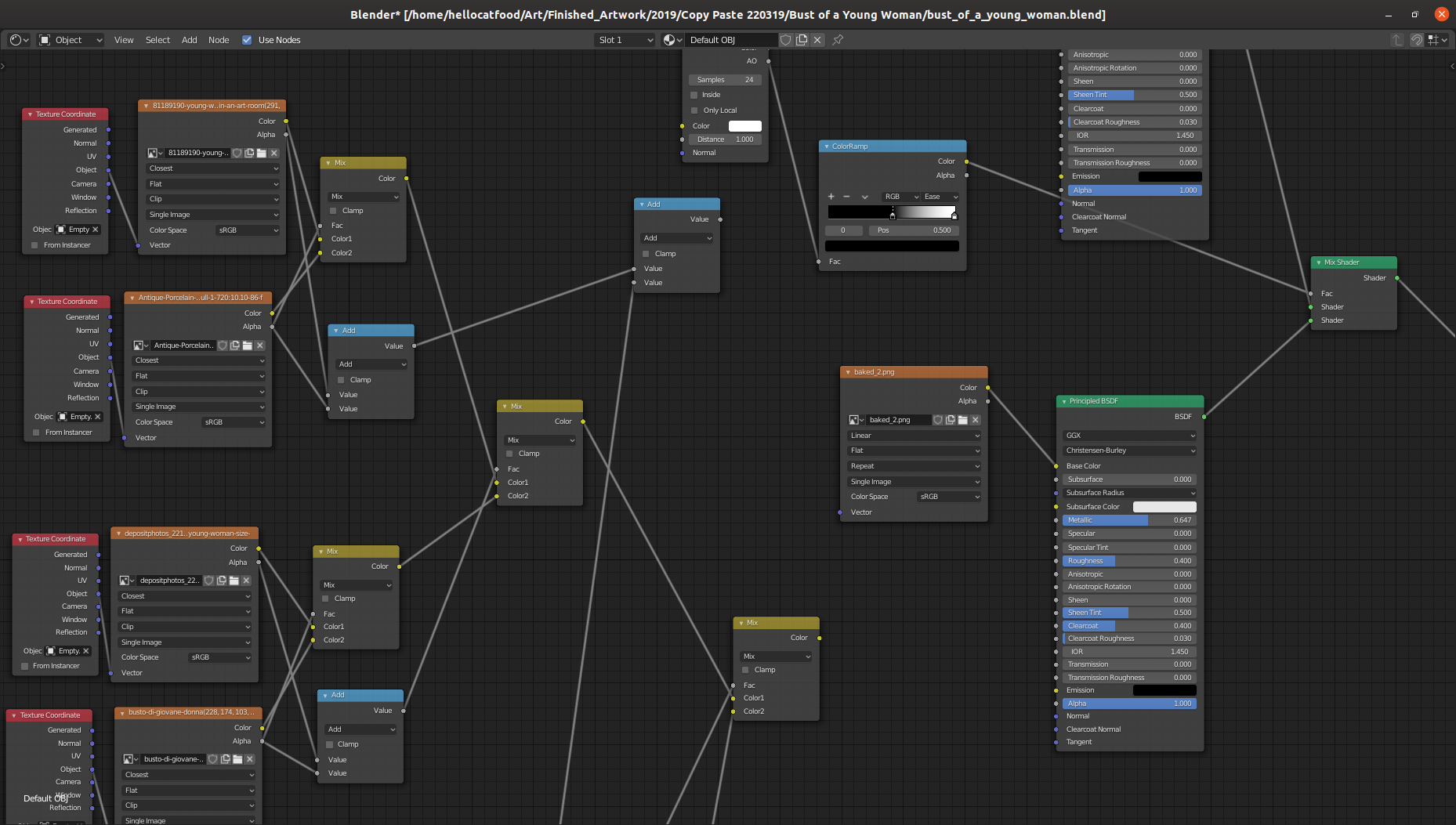
For this work I decided to use a similar aesthetic and process to Visually Similar. I talked a little bit about the process behind Visually Similar in a June’s Development Update. The node tree to overlay each of the transparent textures looked a bit like this.

Click to embiggen
Click to embiggen

When trying to do the same with the Toggler artwork I came across something weird that meant some textures just weren’t showing. So I decided to ask on Stack Exchange and Reddit why this might be the case.


Installing Bcc: at Vivid Projects part 3

In this final part of this three-part series I’ll be going over installing Xuan Ye’s work in the Bcc exhibition. This work posed a similar challenge to Scott Benesiinaabandan’s work. I needed to automatically load a web page except this time I needed to allow for user interaction via the mouse and keyboard.

The artwork isn’t online so I’ll again go over the basic premise. A web page is loaded that features a tiled graphic with faded captcha text on top of it. The user is asked to input the text and upon doing so is presented with a new tiled background image and new captcha. This process is repeated until the user decides to stop.


Installing Bcc: at Vivid Projects part 2

The next artwork that was challenging to install was Monuments: Psychic Landscapes by Scott Benesiinaabandan.

Bcc:

I won’t be showing the full artwork as all of the artworks were exclusive to Bcc: and it’s up to the artists whether they show it or not. On a visual level the basic premise of the artwork is that the viewer visits a web page which loads an artwork in the form of a Processing sketch. There is a statue in the centre which becomes obscured by lots of abstract shapes over time whilst an ambient soundtrack plays in the background. At whatever point the viewer chooses they can refresh the screen to clear all of the shapes, once again revealing the statue.


Installing Bcc: at Vivid Projects part 1

I took a bit of a break from writing the Development Updates. September was pretty busy with Bcc: (more on that below) and then I was completing a commission for Will’s Kitchen/The Shakespeare Birthplace Trust and preparing for my solo exhibition, We Are Your Friends.

With all of that now completed I’m writing a few posts about one project in particular: Bcc:

The Bcc: exhibition opened at Vivid Projects on Friday 6th September. It was a collaboration between Vancouver-based Decoy Magazine and Birmingham-based Vivid Projects. The exhibition featured a curated selection of works from Decoy Magazine’s online art subscription service called Bcc:. The basic premise is that each month you’d get specially commissioned art in your e-mail inbox.


What's happening on Twitter

The following is compiled from a bunch of Tweets that I made in December 2018. After reading you’ll see why I have to write it here! While it is not directly related with programming or making art, it does help with Getting Things Done, so I decided to include it here.

Like many people I’ve started to remove myself from a lot of social media websites. First was Facebook in 2017. The reason for this is that was really annoyed that it was using nostalgia to manipulate me into staying on the website. In shoving 10 year-old photos into my view through the On This Day feature it was giving me little hits of dopamine by reminding me of the good ol’ times, even if they were 10 years ago with people that, for whatever reason, are no longer part of my life.


Select objects of similar size in Inkscape

For the AlgoMech 2019 festival in June I created a new performative drawing piece, A Perfect Circle. The piece is about how we interface with computers that analyse our activities. It consists of a video and accompanying plotter drawings.

Making A Perfect Circle presented me with a few challenges. The make the video element I hacked together a couple of Processing scripts that did basic motion tracking by following a user-specified colour. It would draw these lines, creating new lines (instead of adding to an existing line) at each major turn and giving them a unique colour.


Convert Object texture coordinates to UV in Blender

Making digital art is quite a lengthy process and even moreso if you’re using non standard processes or making your own software. For awhile I’ve wanted to write about my processes and how I’ve overcome the bugs and problems. In what will hopefully be a regular series of blog posts I’m going to give a bit of insight into this process. In a way it’ll be a tutorial. Let’s go!


Five Days of Pure Data - Live Coding

In the years that I’ve been creating things in Pure Data I have amassed quite a collection of unfinished and messy patches. Over the last few days I have been releasing a few of these patches and techniques that I implement when programming in Pure Data.

Live Coding

The last tutorial isn’t that much about actually programming with Pure Data and is more about performing with it. More specifically, live coding. Live coding takes programming to a performative level. There’s been a lot of writing recently about Live Coding so take a look around. I’ve been programming live visuals for Pure Data since 2014 (a lot happened that year). It’s not without it’s problems, some of which I written about in the past.


Five Days of Pure Data - Stop Motion

In the years that I’ve been creating things in Pure Data I have amassed quite a collection of unfinished and messy patches. Over the next few days I’ll be releasing a few of these patches and techniques that I implement when programming in Pure Data.

Stop Motion

It was at the Co-Position meeting of the Libre Graphics Research Unit in 2012 that I first encountered Toonloop. It’s creator, Alexandre Quessy, gave a live performance using lights, Lego pieces and other objects. I was really quite in awe of how stop-motion was used to create quite an enjoyable performance.


Five Days of Pure Data - Infinite Scrolling

In the years that I’ve been creating things in Pure Data I have amassed quite a collection of unfinished and messy patches. Over the next few days I’ll be releasing a few of these patches and techniques that I implement when programming in Pure Data.

Infinite Scrolling

For a performance at ChipFest 10 in 2014 I wanted to recreate the look of a scrolling video game but within Pure Data. Sure, I could have just used a console emulator or recorded a clip and used that but doing it all within Pure Data allows me to have some more flexibility with how I perform. Here’s what I made:


Five Days of Pure Data - Randomise Text

In the years that I’ve been creating things in Pure Data I have amassed quite a collection of unfinished and messy patches. Over the next few days I’ll be releasing a few of these patches and techniques that I implement when programming in Pure Data.

Randomise Text

In the early 2010s I had quite an interest in zines. I had co-organised the Birmingham Zine Festival and was quite regularly reading this. As a result of this in 2011 I started collaborating with a friend, Rebecca Evans, on a collaborative zine. The concept is that we would interpret each others’ way of working using our regularly used tools. Rebecca specialises in textiles and has quite a skill at crocheting, amongst other things. I, on the other hand, can barely operate a sewing machine and feel much more at home using a soldering iron or computer.


Five Days of Pure Data - Image to Signal

In the years that I’ve been creating things in Pure Data I have amassed quite a collection of unfinished and messy patches. Over the next few days I’ll be releasing a few of these patches and techniques that I implement when programming in Pure Data.

Image to Signal

If you’re into experimental ways of creating visuals and happened to be on the internet around 2013 you have have been sent information about software called PixiVisor. The software, developed by Alexander Zoloto, allows one to transmit an image via an audio signal to another device which decodes it and displays it as an image. In this way you can then apply audio effects to the signal and make some pretty cool visuals. I never tried it myself but was quite impressed by what I saw.


Making of Blood Sport - Live at Cafe Oto video

On 5th May Blood Sport released their latest LP, Live at Cafe Oto which, as the name suggests, is a live recording of a 40 minute set they did as part of their residency at Cafe Oto.

To coincide with its release Blood Sport asked me to create a one-take video. The video below shows track two from the LP, Melts Into.

I first met Blood Sport whilst doing visuals for them + Heavy Lifting at the AlgoMech closing party. The visuals for that night, and my visuals in general, tend to be quite visuals noisy and heavily saturated with colour and pattern.