tag: Linux
Motion Interpolation for Glitch Aesthetics using FFmpeg part 9
Below are a few examples of how you can use FFmpeg’s minterpolate to create artworks with a glitch aesthetic.
You can read about how I used it for an artwork in this blog post. You can also grab the source file for these videos here. Give it a try yourself!
mc_mode=aobmc:me_mode=bilat:me=ds
ffmpeg -i cat_rainbow_original.mp4 -filter:v "setpts=62.5*PTS,minterpolate='fps=25:mb_size=16:search_param=400:vsbmc=0:scd=none:mc_mode=aobmc:me_mode=bilat:me=ds'" 033_mc_mode=aobmc_me_mode=bilat_me=ds.mp4
mc_mode=aobmc:me_mode=bilat:me=hexbs
ffmpeg -i cat_rainbow_original.mp4 -filter:v "setpts=62.5*PTS,minterpolate='fps=25:mb_size=16:search_param=400:vsbmc=0:scd=none:mc_mode=aobmc:me_mode=bilat:me=hexbs'" 034_mc_mode=aobmc_me_mode=bilat_me=hexbs.mp4
mc_mode=aobmc:me_mode=bilat:me=epzs
ffmpeg -i cat_rainbow_original.mp4 -filter:v "setpts=62.5*PTS,minterpolate='fps=25:mb_size=16:search_param=400:vsbmc=0:scd=none:mc_mode=aobmc:me_mode=bilat:me=epzs'" 035_mc_mode=aobmc_me_mode=bilat_me=epzs.mp4
mc_mode=aobmc:me_mode=bilat:me=umh
ffmpeg -i cat_rainbow_original.mp4 -filter:v "setpts=62.5*PTS,minterpolate='fps=25:mb_size=16:search_param=400:vsbmc=0:scd=none:mc_mode=aobmc:me_mode=bilat:me=umh'" 036_mc_mode=aobmc_me_mode=bilat_me=umh.mp4
This blog post is part of a series. Click the links below to see more examples of FFmpeg’s motion interpolation:
Motion Interpolation for Glitch Aesthetics using FFmpeg part 8
Below are a few examples of how you can use FFmpeg’s minterpolate to create artworks with a glitch aesthetic.
You can read about how I used it for an artwork in this blog post. You can also grab the source file for these videos here. Give it a try yourself!
mc_mode=aobmc:me_mode=bilat:me=tss
ffmpeg -i cat_rainbow_original.mp4 -filter:v "setpts=62.5*PTS,minterpolate='fps=25:mb_size=16:search_param=400:vsbmc=0:scd=none:mc_mode=aobmc:me_mode=bilat:me=tss'" 029_mc_mode=aobmc_me_mode=bilat_me=tss.mp4
mc_mode=aobmc:me_mode=bilat:me=tdls
ffmpeg -i cat_rainbow_original.mp4 -filter:v "setpts=62.5*PTS,minterpolate='fps=25:mb_size=16:search_param=400:vsbmc=0:scd=none:mc_mode=aobmc:me_mode=bilat:me=tdls'" 030_mc_mode=aobmc_me_mode=bilat_me=tdls.mp4
mc_mode=aobmc:me_mode=bilat:me=ntss
ffmpeg -i cat_rainbow_original.mp4 -filter:v "setpts=62.5*PTS,minterpolate='fps=25:mb_size=16:search_param=400:vsbmc=0:scd=none:mc_mode=aobmc:me_mode=bilat:me=ntss'" 031_mc_mode=aobmc_me_mode=bilat_me=ntss.mp4
mc_mode=aobmc:me_mode=bilat:me=fss
ffmpeg -i cat_rainbow_original.mp4 -filter:v "setpts=62.5*PTS,minterpolate='fps=25:mb_size=16:search_param=400:vsbmc=0:scd=none:mc_mode=aobmc:me_mode=bilat:me=fss'" 032_mc_mode=aobmc_me_mode=bilat_me=fss.mp4
This blog post is part of a series. Click the links below to see more examples of FFmpeg’s motion interpolation:
Motion Interpolation for Glitch Aesthetics using FFmpeg part 7
Below are a few examples of how you can use FFmpeg’s minterpolate to create artworks with a glitch aesthetic.
You can read about how I used it for an artwork in this blog post. You can also grab the source file for these videos here. Give it a try yourself!
mc_mode=obmc:me_mode=bilat:me=hexbs
ffmpeg -i cat_rainbow_original.mp4 -filter:v "setpts=62.5*PTS,minterpolate='fps=25:mb_size=16:search_param=400:vsbmc=0:scd=none:mc_mode=obmc:me_mode=bilat:me=hexbs'" 025_mc_mode=obmc_me_mode=bilat_me=hexbs.mp4
mc_mode=obmc:me_mode=bilat:me=epzs
ffmpeg -i cat_rainbow_original.mp4 -filter:v "setpts=62.5*PTS,minterpolate='fps=25:mb_size=16:search_param=400:vsbmc=0:scd=none:mc_mode=obmc:me_mode=bilat:me=epzs'" 026_mc_mode=obmc_me_mode=bilat_me=epzs.mp4
mc_mode=obmc:me_mode=bilat:me=umh
ffmpeg -i cat_rainbow_original.mp4 -filter:v "setpts=62.5*PTS,minterpolate='fps=25:mb_size=16:search_param=400:vsbmc=0:scd=none:mc_mode=obmc:me_mode=bilat:me=umh'" 027_mc_mode=obmc_me_mode=bilat_me=umh.mp4
mc_mode=aobmc:me_mode=bilat:me=esa
ffmpeg -i cat_rainbow_original.mp4 -filter:v "setpts=62.5*PTS,minterpolate='fps=25:mb_size=16:search_param=400:vsbmc=0:scd=none:mc_mode=aobmc:me_mode=bilat:me=esa'" 028_mc_mode=aobmc_me_mode=bilat_me=esa.mp4
This blog post is part of a series. Click the links below to see more examples of FFmpeg’s motion interpolation:
Motion Interpolation for Glitch Aesthetics using FFmpeg part 6
Below are a few examples of how you can use FFmpeg’s minterpolate to create artworks with a glitch aesthetic.
You can read about how I used it for an artwork in this blog post. You can also grab the source file for these videos here. Give it a try yourself!
mc_mode=obmc:me_mode=bilat:me=tdls
ffmpeg -i cat_rainbow_original.mp4 -filter:v "setpts=62.5*PTS,minterpolate='fps=25:mb_size=16:search_param=400:vsbmc=0:scd=none:mc_mode=obmc:me_mode=bilat:me=tdls'" 021_mc_mode=obmc_me_mode=bilat_me=tdls.mp4
mc_mode=obmc:me_mode=bilat:me=ntss
ffmpeg -i cat_rainbow_original.mp4 -filter:v "setpts=62.5*PTS,minterpolate='fps=25:mb_size=16:search_param=400:vsbmc=0:scd=none:mc_mode=obmc:me_mode=bilat:me=ntss'" 022_mc_mode=obmc_me_mode=bilat_me=ntss.mp4
mc_mode=obmc:me_mode=bilat:me=fss
ffmpeg -i cat_rainbow_original.mp4 -filter:v "setpts=62.5*PTS,minterpolate='fps=25:mb_size=16:search_param=400:vsbmc=0:scd=none:mc_mode=obmc:me_mode=bilat:me=fss'" 023_mc_mode=obmc_me_mode=bilat_me=fss.mp4
mc_mode=obmc:me_mode=bilat:me=ds
ffmpeg -i cat_rainbow_original.mp4 -filter:v "setpts=62.5*PTS,minterpolate='fps=25:mb_size=16:search_param=400:vsbmc=0:scd=none:mc_mode=obmc:me_mode=bilat:me=ds'" 024_mc_mode=obmc_me_mode=bilat_me=ds.mp4
This blog post is part of a series. Click the links below to see more examples of FFmpeg’s motion interpolation:
Motion Interpolation for Glitch Aesthetics using FFmpeg part 5
Below are a few examples of how you can use FFmpeg’s minterpolate to create artworks with a glitch aesthetic.
You can read about how I used it for an artwork in this blog post. You can also grab the source file for these videos here. Give it a try yourself!
mc_mode=aobmc:me_mode=bidir:me=epzs
ffmpeg -i cat_rainbow_original.mp4 -filter:v "setpts=62.5*PTS,minterpolate='fps=25:mb_size=16:search_param=400:vsbmc=0:scd=none:mc_mode=aobmc:me_mode=bidir:me=epzs:'" 017_mc_mode=aobmc_me_mode=bidir_me=epzs.mp4
mc_mode=aobmc:me_mode=bidir:me=umh
ffmpeg -i cat_rainbow_original.mp4 -filter:v "setpts=62.5*PTS,minterpolate='fps=25:mb_size=16:search_param=400:vsbmc=0:scd=none:mc_mode=aobmc:me_mode=bidir:me=umh'" 018_mc_mode=aobmc_me_mode=bidir_me=umh.mp4
mc_mode=obmc:me_mode=bilat:me=esa
ffmpeg -i cat_rainbow_original.mp4 -filter:v "setpts=62.5*PTS,minterpolate='fps=25:mb_size=16:search_param=400:vsbmc=0:scd=none:mc_mode=obmc:me_mode=bilat:me=esa'" 019_mc_mode=obmc_me_mode=bilat_me=esa.mp4
mc_mode=obmc:me_mode=bilat:me=tss
ffmpeg -i cat_rainbow_original.mp4 -filter:v "setpts=62.5*PTS,minterpolate='fps=25:mb_size=16:search_param=400:vsbmc=0:scd=none:mc_mode=obmc:me_mode=bilat:me=tss'" 020_mc_mode=obmc_me_mode=bilat_me=tss.mp4
This blog post is part of a series. Click the links below to see more examples of FFmpeg’s motion interpolation:
Motion Interpolation for Glitch Aesthetics using FFmpeg part 4
Below are a few examples of how you can use FFmpeg’s minterpolate to create artworks with a glitch aesthetic.
You can read about how I used it for an artwork in this blog post. You can also grab the source file for these videos here. Give it a try yourself!
mc_mode=aobmc:me_mode=bidir:me=ntss
ffmpeg -i cat_rainbow_original.mp4 -filter:v "setpts=62.5*PTS,minterpolate='fps=25:mb_size=16:search_param=400:vsbmc=0:scd=none:mc_mode=aobmc:me_mode=bidir:me=ntss'" 013_mc_mode=aobmc_me_mode=bidir_me=ntss.mp4
mc_mode=aobmc:me_mode=bidir:me=fss
ffmpeg -i cat_rainbow_original.mp4 -filter:v "setpts=62.5*PTS,minterpolate='fps=25:mb_size=16:search_param=400:vsbmc=0:scd=none:mc_mode=aobmc:me_mode=bidir:me=fss'" 014_mc_mode=aobmc_me_mode=bidir_me=fss.mp4
mc_mode=aobmc:me_mode=bidir:me=ds
ffmpeg -i cat_rainbow_original.mp4 -filter:v "setpts=62.5*PTS,minterpolate='fps=25:mb_size=16:search_param=400:vsbmc=0:scd=none:mc_mode=aobmc:me_mode=bidir:me=ds'" 015_mc_mode=aobmc_me_mode=bidir_me=ds.mp4
mc_mode=aobmc:me_mode=bidir:me=hexbs
ffmpeg -i cat_rainbow_original.mp4 -filter:v "setpts=62.5*PTS,minterpolate='fps=25:mb_size=16:search_param=400:vsbmc=0:scd=none:mc_mode=aobmc:me_mode=bidir:me=hexbs'" 016_mc_mode=aobmc_me_mode=bidir_me=hexbs.mp4
This blog post is part of a series. Click the links below to see more examples of FFmpeg’s motion interpolation:
Motion Interpolation for Glitch Aesthetics using FFmpeg part 3
Below are a few examples of how you can use FFmpeg’s minterpolate to create artworks with a glitch aesthetic.
You can read about how I used it for an artwork in this blog post. You can also grab the source file for these videos here. Give it a try yourself!
mc_mode=obmc:me_mode=bidir:me=umh
ffmpeg -i cat_rainbow_original.mp4 -filter:v "setpts=62.5*PTS,minterpolate='fps=25:mb_size=16:search_param=400:vsbmc=0:scd=none:mc_mode=obmc:me_mode=bidir:me=umh'" 009_mc_mode=obmc_me_mode=bidir_me=umh.mp4
mc_mode=aobmc:me_mode=bidir:me=esa
ffmpeg -i cat_rainbow_original.mp4 -filter:v "setpts=62.5*PTS,minterpolate='fps=25:mb_size=16:search_param=400:vsbmc=0:scd=none:mc_mode=aobmc:me_mode=bidir:me=esa'" 010_mc_mode=aobmc_me_mode=bidir_me=esa.mp4
mc_mode=aobmc:me_mode=bidir:me=tss
ffmpeg -i cat_rainbow_original.mp4 -filter:v "setpts=62.5*PTS,minterpolate='fps=25:mb_size=16:search_param=400:vsbmc=0:scd=none:mc_mode=aobmc:me_mode=bidir:me=tss'" 011_mc_mode=aobmc_me_mode=bidir_me=tss.mp4
mc_mode=aobmc:me_mode=bidir:me=tdls
ffmpeg -i cat_rainbow_original.mp4 -filter:v "setpts=62.5*PTS,minterpolate='fps=25:mb_size=16:search_param=400:vsbmc=0:scd=none:mc_mode=aobmc:me_mode=bidir:me=tdls'" 012_mc_mode=aobmc_me_mode=bidir_me=tdls.mp4
This blog post is part of a series. Click the links below to see more examples of FFmpeg’s motion interpolation:
Motion Interpolation for Glitch Aesthetics using FFmpeg part 2
Below are a few examples of how you can use FFmpeg’s minterpolate to create artworks with a glitch aesthetic.
You can read about how I used it for an artwork in this blog post. You can also grab the source file for these videos here. Give it a try yourself!
mc_mode=obmc:me_mode=bidir:me=fss
ffmpeg -i cat_rainbow_original.mp4 -filter:v "setpts=62.5*PTS,minterpolate='fps=25:mb_size=16:search_param=400:vsbmc=0:scd=none:mc_mode=obmc:me_mode=bidir:me=fss'" 005_mc_mode=obmc_me_mode=bidir_me=fss.mp4
mc_mode=obmc:me_mode=bidir:me=ds
ffmpeg -i cat_rainbow_original.mp4 -filter:v "setpts=62.5*PTS,minterpolate='fps=25:mb_size=16:search_param=400:vsbmc=0:scd=none:mc_mode=obmc:me_mode=bidir:me=ds'" 006_mc_mode=obmc_me_mode=bidir_me=ds.mp4
mc_mode=obmc:me_mode=bidir:me=hexbs
ffmpeg -i cat_rainbow_original.mp4 -filter:v "setpts=62.5*PTS,minterpolate='fps=25:mb_size=16:search_param=400:vsbmc=0:scd=none:mc_mode=obmc:me_mode=bidir:me=hexbs'" 007_mc_mode=obmc_me_mode=bidir_me=hexbs.mp4
mc_mode=obmc:me_mode=bidir:me=epzs
ffmpeg -i cat_rainbow_original.mp4 -filter:v "setpts=62.5*PTS,minterpolate='fps=25:mb_size=16:search_param=400:vsbmc=0:scd=none:mc_mode=obmc:me_mode=bidir:me=epzs'" 008_mc_mode=obmc_me_mode=bidir_me=epzs.mp4
This blog post is part of a series. Click the links below to see more examples of FFmpeg’s motion interpolation:
Motion Interpolation for Glitch Aesthetics using FFmpeg part 1
Below are a few examples of how you can use FFmpeg’s minterpolate to create artworks with a glitch aesthetic.
You can read about how I used it for an artwork in this blog post. You can also grab the source file for these videos here. Give it a try yourself!
mc_mode=obmc:me_mode=bidir:me=esa
ffmpeg -i cat_rainbow_original.mp4 -filter:v "setpts=62.5*PTS,minterpolate='fps=25:mb_size=16:search_param=400:vsbmc=0:scd=none:mc_mode=obmc:me_mode=bidir:me=esa'" 001_mc_mode=obmc_me_mode=bidir_me=esa.mp4
mc_mode=obmc:me_mode=bidir:me=tss
ffmpeg -i cat_rainbow_original.mp4 -filter:v "setpts=62.5*PTS,minterpolate='fps=25:mb_size=16:search_param=400:vsbmc=0:scd=none:mc_mode=obmc:me_mode=bidir:me=tss'" 002_mc_mode=obmc_me_mode=bidir_me=tss.mp4
mc_mode=obmc:me_mode=bidir:me=tdls
ffmpeg -i cat_rainbow_original.mp4 -filter:v "setpts=62.5*PTS,minterpolate='fps=25:mb_size=16:search_param=400:vsbmc=0:scd=none:mc_mode=obmc:me_mode=bidir:me=tdls'"003_mc_mode=obmc_me_mode=bidir_me=tdls.mp4
mc_mode=obmc:me_mode=bidir:me=ntss
ffmpeg -i cat_rainbow_original.mp4 -filter:v "setpts=62.5*PTS,minterpolate='fps=25:mb_size=16:search_param=400:vsbmc=0:scd=none:mc_mode=obmc:me_mode=bidir:me=ntss'"004_mc_mode=obmc_me_mode=bidir_me=ntss.mp4
This blog post is part of a series. Click the links below to see more examples of FFmpeg’s motion interpolation:
Motion Interpolation for Glitch Aesthetics using FFmpeg part 0
As you may have seen in this blog post I made use of FFmpeg’s minterpolate motion interpolation options to make all of the faces morph. There’s quite a few options for minterpolate and many different combinations of options that can be used. i had to consult Wikipedia to figure out exactly what the different motion estimation algorithms were but even with that information I couldn’t visualise how it would change the output. To add to this how I’m using minterpolate isn’t a typical use case.
(mis)Using FFmpeg's Motion Interpolation Options
Towards the end of the Let’s Never Meet video the robotic faces slowly morph into something a little bit more human-like.
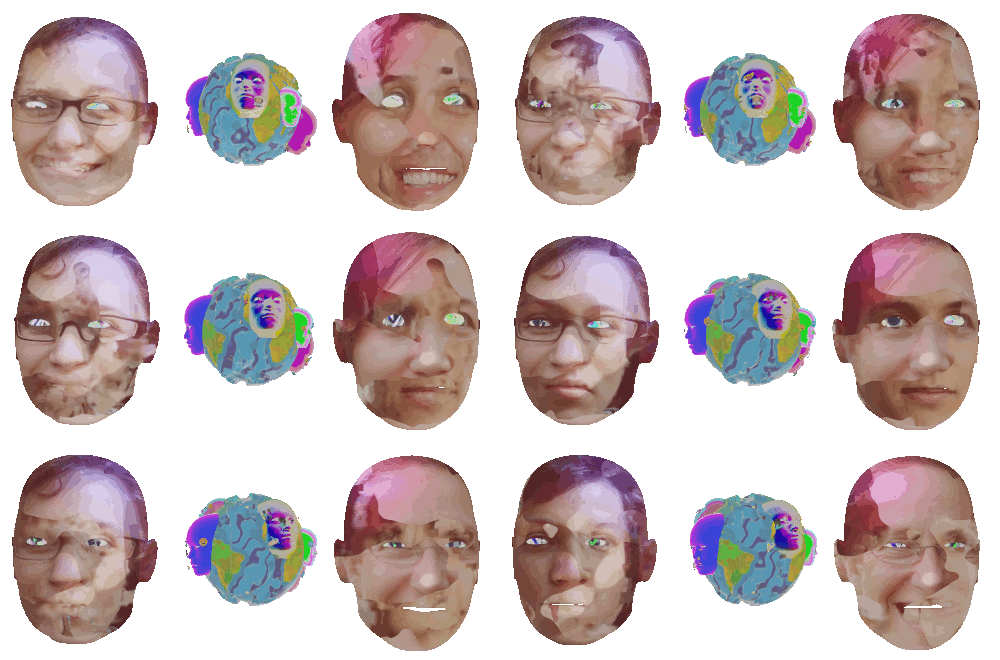
These faces continue to morph between lots of different faces, suggesting that when getting to know people you can never really settle on who they are. To make the faces morph I used motion interpolation to morph between each face. Here’s what Wikipedia has to say about motion interpolation.
Producing audio for Let's Never Meet
For the majority of my career in art I’ve been primarily known for my visual artwork. I’ve dabbled in making noises with my Sonification Studies performances (which may make a comeback at some point) but it’s only since my 2018 performance at databit.me that I’ve regularly made and performed music.
On the performance side I’ve mostly used TidalCycles. You may have seen that I have been doing live streams of my rehearsals.
Adventures in Vector Quantization
Ever since seeing Radio Dada by Rosa Menkman I’ve been forever trying to reproduce the style of compression/glitches it uses.
In my limited knowledge about the production of the video I do know what it uses compression artifacts found in the Cinepak codec. So, I set out to try and find a way of converting a video to a video that uses the Cinepak codec. If you’ve been following me you’ll that I’ve asked for help on many fora and mailing lists for help with initially little success.
What Glitch? scripts
For the What is Your Glitch? videos I wanted to build up on some of the extensive work that has already gone into the documentation, deconstruction and glitching of file formats. Rosa Menkman has already done a great job of documenting some of the more well-known file format glitches in the Vernacular of File Formats, which I recommend you all read. For this exercise I wanted to explore some of the more obscure file formats. Using open source software and Ubuntu has given me access to a wealth of programs that can still generate obscure file formats, such as pcx, pix and sgi. Through these experiments I also found inconsistencies in the way that different programs generate files, which is evident through my decision to use GIMP to convert files rather than Imagemagick in some of the scripts. Enough chit-chat, download the scripts!
Echobender
Myself and Mez recently finished a script called Echobender that automatically databends images.
](/blog/echobender/images/echobender_hu_2e801010d0ea1fdd.jpg)
To use it you’ll need:
- A computer with Linux installed. I don’t have a Windows or Mac PC so I can’t test it on those
- Sox. On Ubuntu you can install it via
sudo apt-get install sox - Convert, which is part of ImageMagick. On Ubuntu you can install it via
sudo apt-get install imagemagick
Once you have those installed just execute ./echobender.sh from the terminal and then drop a .jpg or .bmp file into it. The output will be in a folder called “echo”.
Ubuntu Bug Jam

From Friday 2nd to Sunday many Ubuntu, Linux and Open Source enthusiasts descended upon the Linux Emporium to take part in the Ubuntu Bug Jam. In the words of an Ubuntu blogger, the Ubuntu Bug Jam is:
…a world-wide online and face-to-face event to get people together to fix Ubuntu bugs - we want to get as many people online fixing bugs, having a great time doing so, and putting their brick in the wall for free software. This is not only a great opportunity to really help Ubuntu, but to also get together with other Ubuntu fans to make a difference together, either via your LoCo team, your LUG, other free software group, or just getting people together in your house/apartment to fix bugs and have a great time.
Anything you can do I can also do
Recently at my job at any one time there’d be up to four different operating systems in just one room. There’d be Windows XP, which was on most of the computers, Windows Vista, which I used to dual boot, Ubuntu, my OS of choice and Mac OS X. I’d often have chats with one of my collegues about the differences between each operating system, and they’d always proclaim that Mac’s are superior to everything else. When asked why they’re so much better he could never give me an answer.
Radio Amarok
My friend Mez informed me that Amarok, the popular media player for Linux and Unix systems is starting its own radio station, imaginatively called Radio Amarok. Whilst I didn’t want to design the website, I did have the pleasure of designing a new logo. After various attempts the panel chose this design:
