Blog

MEMIC - Warpaint!

A great time was had at the first salon for the Midlands Experimental Moving Image Collective on Friday 30th November, despite the cold!

Midlands Experimental Moving Image Collective

Midlands Experimental Moving Image Collective

The webcam that I was hoping to use didn’t work with the Raspberry Pi (something the team are aware of) so I had to use my laptop instead. This didn’t present any problems, but it would’ve been good to show off the Raspberry Pi! ;-) Here’s everything that the webcam capture over the three-hour exhibition:

More photos here


FRAME_birmingham

With the launch of FRAME_birmingham I’m happy to announce that three of my pieces from Some of My Favourite songs will be exhibited and for sale between 17th Nov 2012 - 17th Feb 2013 at venues around Birmingham.

Look What I Did - Fade to Daft

Fade to Daft, which is a image remix of the song of the same name by Look What I Did, is the first of these pieces to be exhibited. It is currently located at the Penfold Grange Suite at Hotel du Vin.

Photo by [Elly Clarke](http://www.ellyclarkephotography.co.uk/ellyclarke/)
Photo by Elly Clarke
Photo by [Elly Clarke](http://www.ellyclarkephotography.co.uk/ellyclarke/)
Photo by Elly Clarke
Photo by Lee Hassall

For those of us not able to spend £500 to spend a night in this suite, you can purchase the work online for £180.


MEMIC Film Salon 1: Warpaint! - Friday 30th November

On Friday 30th November I’ll be taking part in the Midlands Experimental Moving Image Collective’s first salon, entitled Warpaint. It’ll be held at Althorpe Street Studios & Gallery in Leamington Spa [map] from 7pm.

MEMIC Film Salon 1: Warpaint!

MEMIC Film Salon 1: Warpaint is the launch event of MEMIC (Midlands Experimental Moving Image Collective). Come along for a screening of a program of artists’ film and video accompanied by an exhibition of moving image installation works. Including work by artists from around the Midlands (many of whom will be in attendance), as well as work by a number of international artists.

I’ll be demoing glitch camera/Open Camera that was developed as part of my residency at Databit.me in October. It’s a simple script, running on Raspberry Pi, that glitches images from a webcam automatically:

See y’all Friday!


Extrude in Inkscape

To design the poster image for The People VS The Machine I revisited an old technique that wrote about in 2009. The technique used the Extrude extension in Inkscape, combined with the Color > Randomize extension to create what could be described as a stained-glass effect for text.

TPVTM outline

I wanted to do the same and create an extrusion between each letter of the title text. This, however, presented a few challenges. In versions of Inkscape up to 0.49 the extrude extension would only work on two selected objects. Even if you highlighted more than two objects the extension would only choose two of them to apply the extrusion to (I’m still not sure how it decides which two to choose). I could do this manually with each pair of letters, but this would take a long time and could easily get confusing!

Pairing

I took my concerns to the Inkscape bug tracker. I explaind what I expected to see when I ran the extension on two or more objects:

Two objects - one extrusion

If you select two objects it should create one extrusion. Simple enough! Two objects

Four objects - six extrusions

If you select four objects it creates six extrusions. A bit more complicated… Four objects
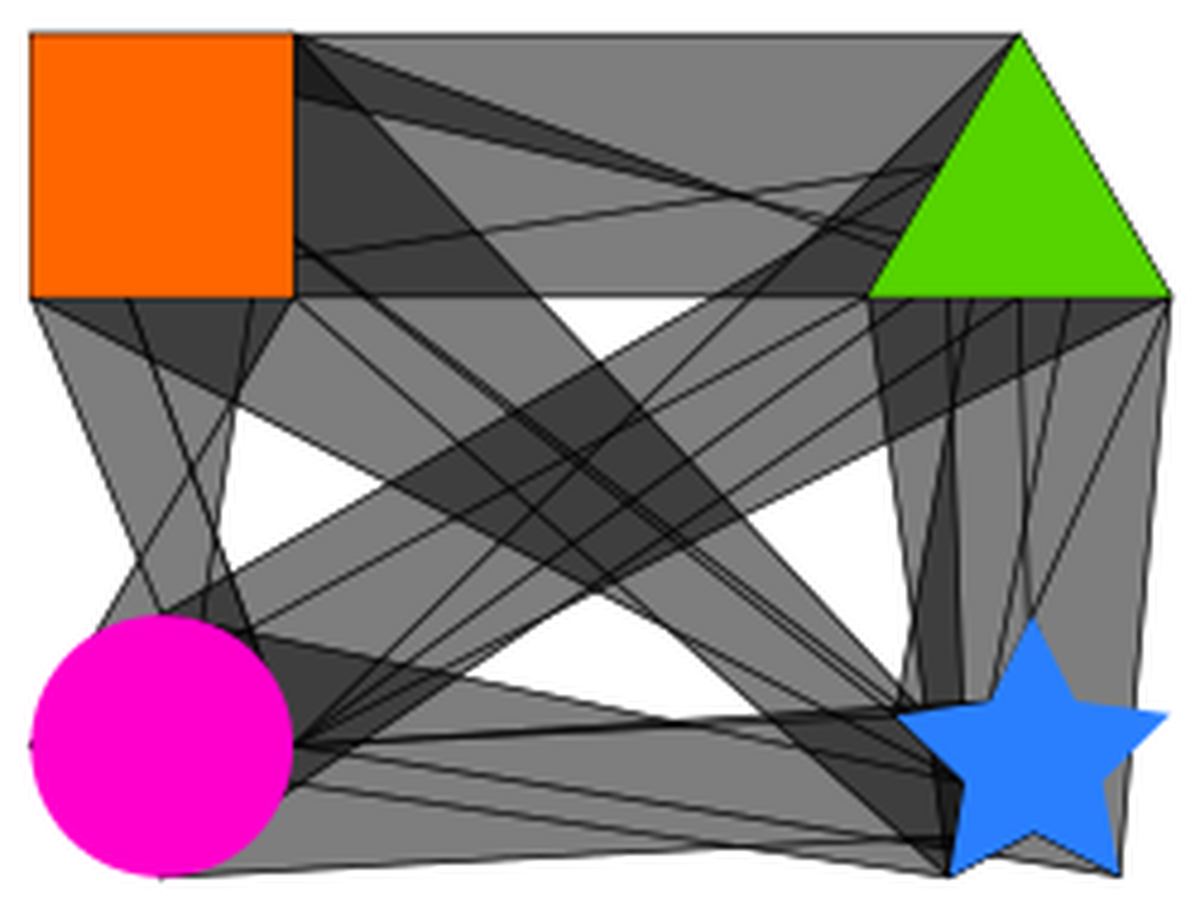
Six objects - fifteen extrusions

If you select six objects it creates fifteen extrusions. Now it gets more complicated! Six objects

As you can imagine doing all of that by hand would take some time and would be hard to keep track of. In fact, for all of the letters I would have to run the Extrude extension 220 times!

I argued my case to the developers of Inkscape on their bug tracker. After a bit of discussion around the intended purpose of the extension it has now been updated to work on all selected objects. The updated extension should be in Inkscape 0.49. Thanks to ~suv and to Alvin Penner for updating the extension!